All teams can take advantage of Agile principles and practices to reap benefits. Even non-Agile teams can Kanban Boards to visualize their work.
WHAT is a Kanban Board?
Kanban boards are physical or digital boards that display work as it progresses through various stages of completion.
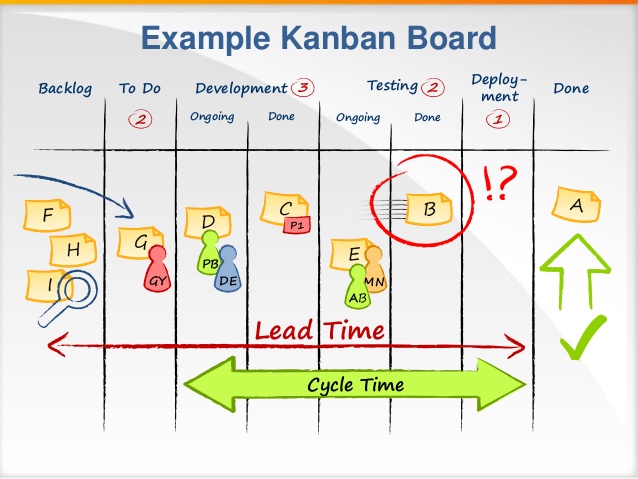
Basic Kanban boards are structured into a few columns describing a backlog / parking lot (the IN pile), key delivery stages (e.g. To Do, In progress, and Done), and sometimes a column to showcase work completed and signed-off (the OUT pile). Please note the basic columns in the example picture below.
Kanbans often prescribe “Work in Progress” (WIP) limits that constrain how many items can be is a specific stage at any one time (red numbers in the picture below). This is based on extensive research that proves smaller queues result in higher priority.

Kanban boards are very versatile and can be used in many scenarios. They can be used for teams trying to coordinate their work within a specific period of time like week or month. They can be used within the context of a project, visualizing progress and completion of tasks. But they can also visualize a workload of a single person at any given point of time. They have even been used in parenting for visualizing chores for kids. More sophisticated Kanban boards are used to visualize manufacturing and other processes.
WHY are Kanban boards used?
- First, there are numerous benefits from visualizing your work. It gives you a clear idea of what you’re working on (so you don’t forget) and what work is getting done (to give us sense of micro-accomplishment). More importantly, its a way of planning and managing future work. Lastly, it provides a way for others (like your boss and colleagues) to see what you are busy with.
- Additionally, Kanban boards visualize workflow, not just a list of tasks. Columns allow you to see different stages, bottlenecks, and how quickly you are getting work done in these stages. That will allow you to identify bottlenecks and have more accurate delivery timelines (Lead Time in picture below).
- Lastly, Kanban boards can be used for basic capacity planning. Imagine every item has a X days estimate on it. Kanban board with these items would allow you to quickly see how much time you need to deliver existing or future work. You could easily identify cross-item dependencies on other items or even create a “Wait” column showing what work is on hold waiting for someone else.
HOW to take advantage of it?
- Visualize your work stages by drawing them as columns on a large board.
- Start writing down your work items (typically on stickies). Initially just place them into the backlog / parking lot column.
- Decide which group of items you or your team has to work on next and place them into “To Do” column.
- As you work through the items, move them across different work steps (e.g. mote item to “In Process” when you’re about to begin working on it.
- Evolve Kanban board over time by adding columns, swim-lanes, and work-in-progress limits.
WHO should facilitate it?
If you’re working in Waterfall, PMI, Prince2 or similar frameworks… the Project Manager is the ideal person to manage Kanban boards and what goes on them.
If you’re working in production or manufacturing process… then the manager or coordinator would be the ideal person to manage Kanban boards.
Please Note! Obviously, benefits are more substantial and even cumulative if your team is actually using a complete Agile framework like Scrum or Scaled Agile (recommended).
But whether your team is just experimenting, in process of transition, or simply trying to learn… I hope this article helps you on your way.
Image credit: ScrumShortCuts.com
 Adam Outside The Box